Node.js Event Loop: Practical Overview and Best Practices

What Is the Event Loop and What Is It Used For?
The Event Loop is a core mechanism that allows Node.js to perform asynchronous operations. It is an infinite loop that processes tasks from queues and runs as long as there are scheduled tasks to handle.
Why it matters:
- Enables concurrency without using multiple threads
- Application performance depends on how fast the loop processes tasks (measured via
perf_hooks) - Alternatives in other languages include multi-threading, goroutines (Go), and virtual threads (Java 21+)
Key Characteristics and Best Practices
A Single Shared Thread
Node.js executes user code on a single thread. Blocking operations such as filesystem access or cryptography are handled in auxiliary threads via a thread pool.
Run-to-Completion
A callback always runs to completion. This eliminates many synchronization issues typical of multithreaded systems.
Event Loop Starvation
The event loop becomes overwhelmed by too many asynchronous operations and cannot keep up with processing.
Blocking the Event Loop
Heavy computations running on the main thread block the entire event loop.
How to avoid blocking
Chunking
Split long-running operations into smaller pieces and yield using setImmediate().
Worker Threads
Parallel JavaScript execution within a single process (stable since Node.js v12 LTS). Each worker has its own event loop and V8 instance.
postMessage()(copies data)SharedArrayBuffer(shared memory)Atomicsfor synchronization when using shared memory
Child Processes / Cluster
- Separate processes with higher isolation but greater overhead
- Each process has its own memory allocation
- Process creation is more expensive than threads
Worker communication:
postMessage()- Simpler, uses structured clone (data copying), suitable for small messagesSharedArrayBuffer- Shared memory without copying, requiresAtomicsfor synchronization, suitable for large datasets or frequent communication
// postMessage - simpler, copies data
worker.postMessage({ type: 'process', data: myArray });
worker.on('message', (result) => console.log(result));

// SharedArrayBuffer - shared memory, no copying
const shared = new SharedArrayBuffer(1024);
const arr = new Int32Array(shared);
worker.postMessage({ buffer: shared });
// Worker can read/write directly to arr
// Atomics.add(arr, 0, 1) - thread-safe increment
Implementations
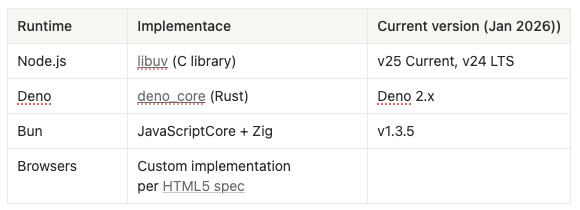
The event loop is not part of the JavaScript engine (V8/JSC). It is implemented externally.
Core Concepts: Macrotasks vs Microtasks
Macrotasks
setTimeoutsetIntervalsetImmediate- I/O operations
Microtasks (Higher Priority)
- Promises (
.then,.catch,.finally) queueMicrotask
nextTick Queue (Highest Priority)
process.nextTick- A separate dedicated queue, not a microtask- Processed before the microtask queue
Key Rule
Between event loop phases, the nextTick queue is fully drained first, then the microtask queue, and only then does the loop proceed to the next phase.

This rule also applies between phases. Both queues always take precedence over macrotasks. A Promise enters the event loop only when it is resolved or rejected, not while it is pending.
Event Loop Phases
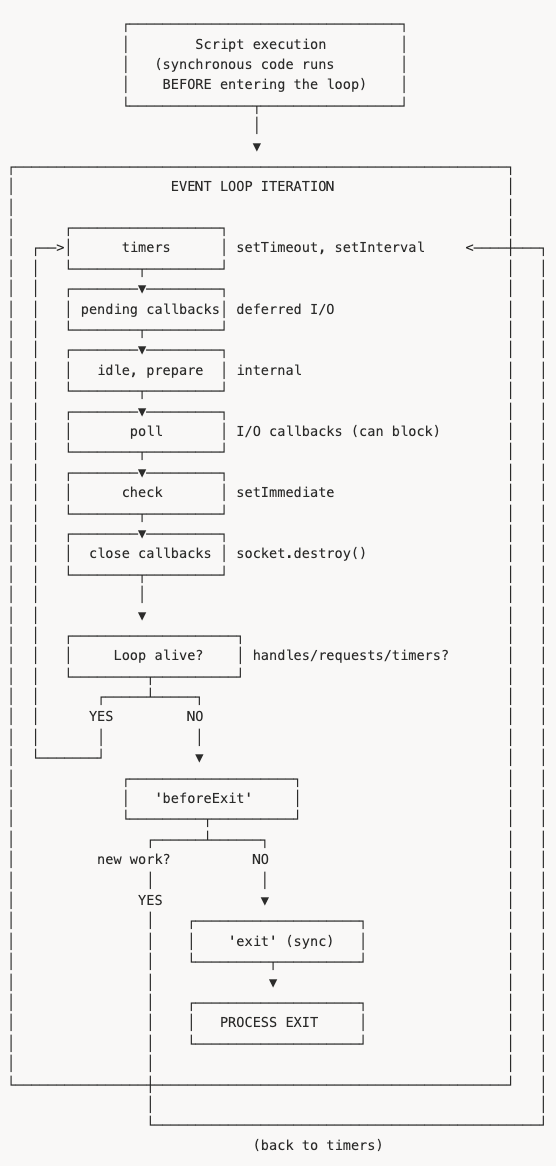
Exit phase notes:
beforeExit- Last chance to schedule work. If new work is scheduled, the loop continues from the timers phase.exit- Only synchronous code runs. Async operations are ignored, not awaited.- Calling
process.exit()explicitly skipsbeforeExit.
nextTick and microtasks are processed:
- Between phases of the event loop
- After each callback within a phase (since Node.js 11+)
Both queues are always fully drained before continuing.
Important details:
- Script execution happens before entering the loop
- Each phase processes all tasks (or until a hard limit)
- A new macrotask of the same type cannot enter the current iteration
- The poll phase may block if waiting for I/O and nothing else is scheduled
- The loop exits when there are no active handles, pending requests, or waiting timers
Change in Node.js 20+ (libuv 1.45.0)
⚠️ Breaking change: This may affect application timing
What changed
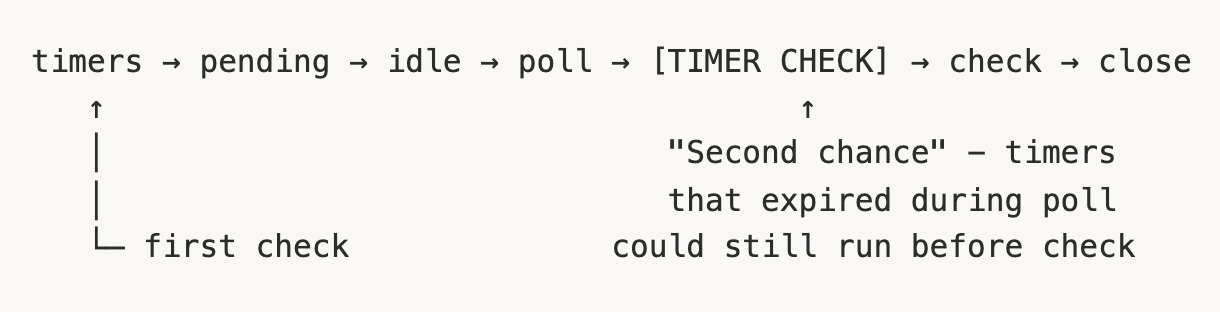
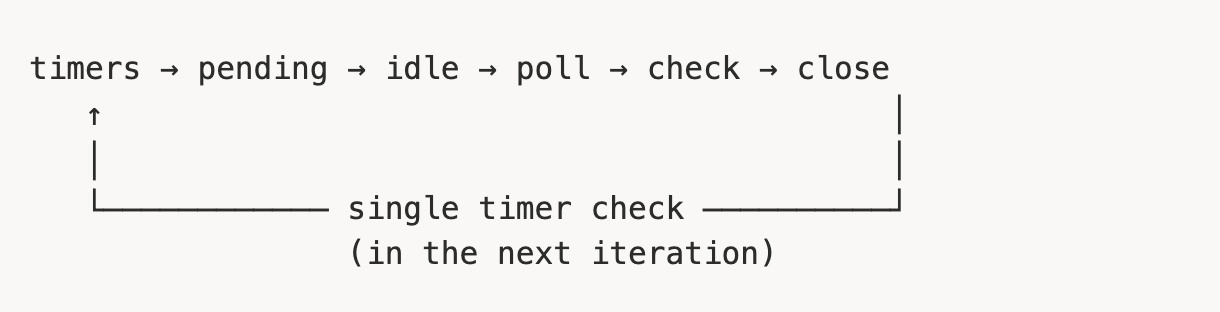
The phases remain the same (timers in the timers phase, setImmediate in the check phase). What changed is when timers are checked for expiration.
Before Node.js 20:
Since Node.js 20:
Impact
Under load (a saturated poll phase), timers may fire later than before. Do not rely on setTimeout(fn, 0) for time-sensitive operations. Monitor event loop lag.
Monitoring the Event Loop
APM tools track event loop lag automatically:
- OpenTelemetry (
@opentelemetry/instrumentation-runtime-node) - Datadog, New Relic, Dynatrace
- Clinic.js for local diagnostics
Manual measurement: perf_hooks.monitorEventLoopDelay()
Practical Examples (Challenge)
Example 1: setTimeout vs setImmediate
console.log('start');
const immediate = setImmediate(() => console.log('immediate'));
setTimeout(() => {
  console.log('timeout');
  clearImmediate(immediate);
}, 0);
console.log('end');
Output: start, end, then either timeout or immediate, timeout depending on whether the timeout is ready when entering the loop.
Example 2: Event Loop Starvation
async function main() {
  console.log('start');
  let run = true;
  setTimeout(() => {
    console.log('timeout');
    run = false;
  }, 0);
  while (run) {
    await Promise.resolve();
  }
}
main();
start and then… nothing. An infinite loop! await Promise.resolve() schedules a microtask. Microtasks have higher priority and are fully drained after every macrotask. The timeout (a macrotask) never executes because the loop keeps adding new microtasks.
Key Takeaways
- The event loop is the heart of Node.js – understanding it is essential for writing performant code.
- Run-to-completion – A callback always finishes execution. No race conditions inside it.
- nextTick > microtasks > macrotasks – The nextTick queue runs first, then promises.
- Do not block the main thread – Move heavy computation to worker threads.
- Use worker threads efficiently – Prefer a worker pool (not per-task workers). Size roughly equals CPU cores. Use
SharedArrayBufferfor large data. - Watch out for starvation –
process.nextTickand infinite async loops can block everything else.
Useful Links
- libuv documentation
- Node.js Event Loop docs
- Clinic.js for Node.js performance diagnostics
- HTML5 Event Loop spec
- Bun runtime
- Deno runtime
If you’re running Node.js in production and want to avoid performance surprises, we’re happy to help. Feel free to reach out if you want a second opinion or a deeper discussion.